Autonomous Server Debugging with Batuta AI's ReAct Loop
Explore how Batuta AI uses the ReAct loop to autonomously debug servers via SSH, iterating through Think, Act, Observe, and Repeat until tasks are complete.
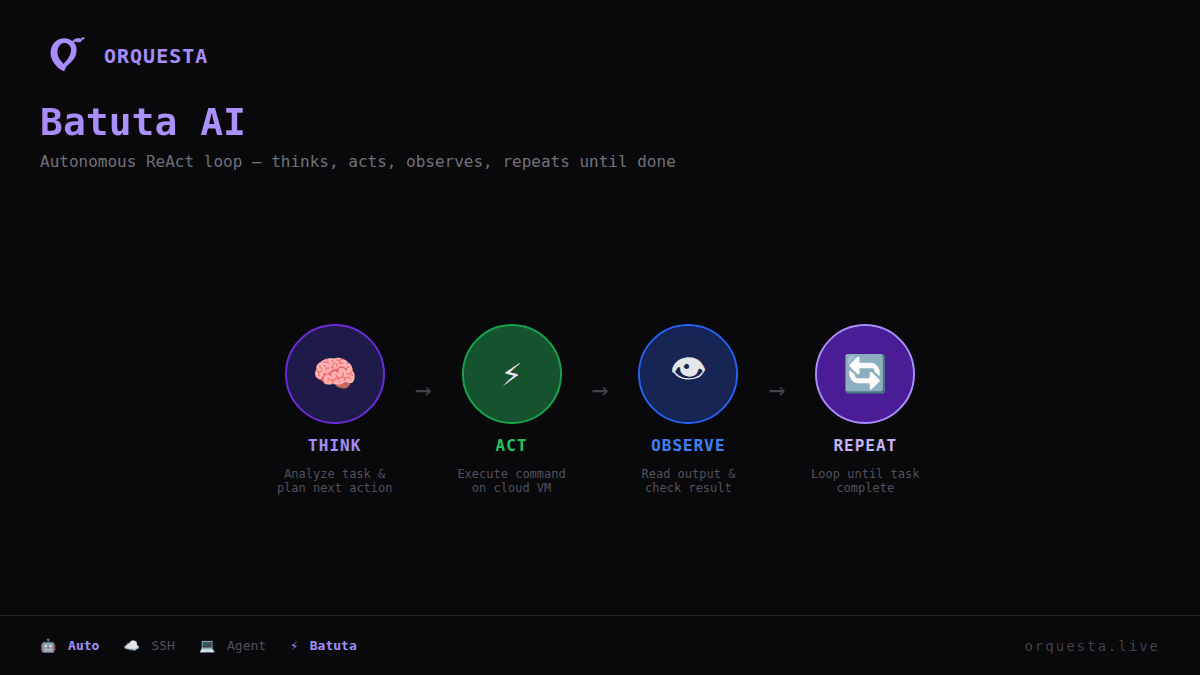
Server debugging can be a daunting task, especially when dealing with intricate systems and environments. However, Orquesta's Batuta AI transforms this process with an autonomous approach that leverages the ReAct loop: Think, Act, Observe, Repeat. This article explores how Batuta connects to cloud VMs via SSH and iteratively resolves issues until the task is complete.
Understanding the ReAct Loop
The ReAct loop is a powerful framework that breaks down the debugging process into four essential steps:
- Think: Analyze the current state and identify potential issues.
- Act: Execute commands to address the identified problems.
- Observe: Monitor the results of the actions taken.
- Repeat: Iterate the process until the desired outcome is achieved.
This iterative approach enables Batuta AI to refine its actions based on real-time feedback, making it exceptionally effective for complex debugging scenarios.
Batuta's SSH Connection to Cloud VMs
One of Batuta's standout features is its ability to directly connect to cloud VMs via SSH. This capability ensures that the debugging process occurs within the user's infrastructure, maintaining data privacy and security. Here's a glimpse of how Batuta establishes an SSH connection:
# SSH command executed by Batuta AI
ssh -i /path/to/private_key user@your_server_ip
Once connected, Batuta assesses the server's state, using the Think phase to gather information.
Real-World Example: Debugging a Web Server Issue
Imagine a scenario where a web server is experiencing intermittent downtime. Here's how Batuta AI could autonomously resolve this issue:
-
Think: Batuta queries the server logs and identifies that the issue might be related to high memory usage.
-
Act: Batuta executes a command to list processes consuming significant memory:
ps aux --sort=-%mem | head -n 5 -
Observe: After observing the output, Batuta detects a specific process consuming excessive resources.
-
Repeat: Batuta continues to execute commands to narrow down the root cause, such as checking configuration files or inspecting recent deployments.
After identifying a misconfigured setting, Batuta modifies the configuration and restarts the service:
# Restart web server
sudo systemctl restart apache2
Multi-Step Debugging with Batuta
In a more complex debugging task, Batuta might need to perform multiple iterations of the ReAct loop. Consider a scenario where a database connection issue is causing application errors:
-
Think: Batuta accesses the application logs and discovers connection timeouts.
-
Act: Tests database connectivity using a simple script:
# Test database connection mysql -u user -p password -h db_host -e 'SHOW DATABASES;' -
Observe: The test indicates a network issue between the application server and the database.
-
Repeat: Batuta tweaks network configurations or explores firewall settings to ensure smooth connectivity.
Conclusion
The ReAct loop allows Batuta AI to autonomously and effectively debug servers, minimizing human intervention and enhancing operational efficiency. By iterating through Think, Act, Observe, and Repeat, Batuta can diagnose and resolve multi-faceted issues in cloud environments. Its ability to connect via SSH and operate within local infrastructures ensures security and compliance, making it an invaluable tool for modern DevOps teams.
The next time you're faced with a stubborn server issue, consider how leveraging Batuta AI's autonomous capabilities can streamline your debugging process and keep your systems running smoothly.
Ready to ship faster with AI?
Start building with Orquesta — from prompt to production in minutes.
Get Started Free →