Effortless Execution with Orquesta's Auto Mode
Discover how Orquesta's Auto Mode intelligently chooses the best execution method—local agent, SSH, or autonomous loop—for your AI tasks.
Understanding Auto Mode in Orquesta
In today's fast-paced development environment, efficiency and flexibility are paramount. Orquesta’s Auto Mode simplifies your workflow by allowing AI to choose the best execution method for your tasks. Whether it's local agents, SSH, or an autonomous execution loop, the Auto Mode intelligently decides how to get the job done. In this article, we’ll explore the benefits and mechanics of Auto Mode and how it enhances team productivity.
What is Auto Mode?
Auto Mode is a feature within Orquesta that takes the burden of execution method selection off your shoulders. Instead of manually choosing how to run your commands, Auto Mode automatically analyzes your task and selects the optimal execution method:
- Local Agent: Executes commands directly on your machine.
- SSH Access: Connects to remote servers securely with no need for manual input.
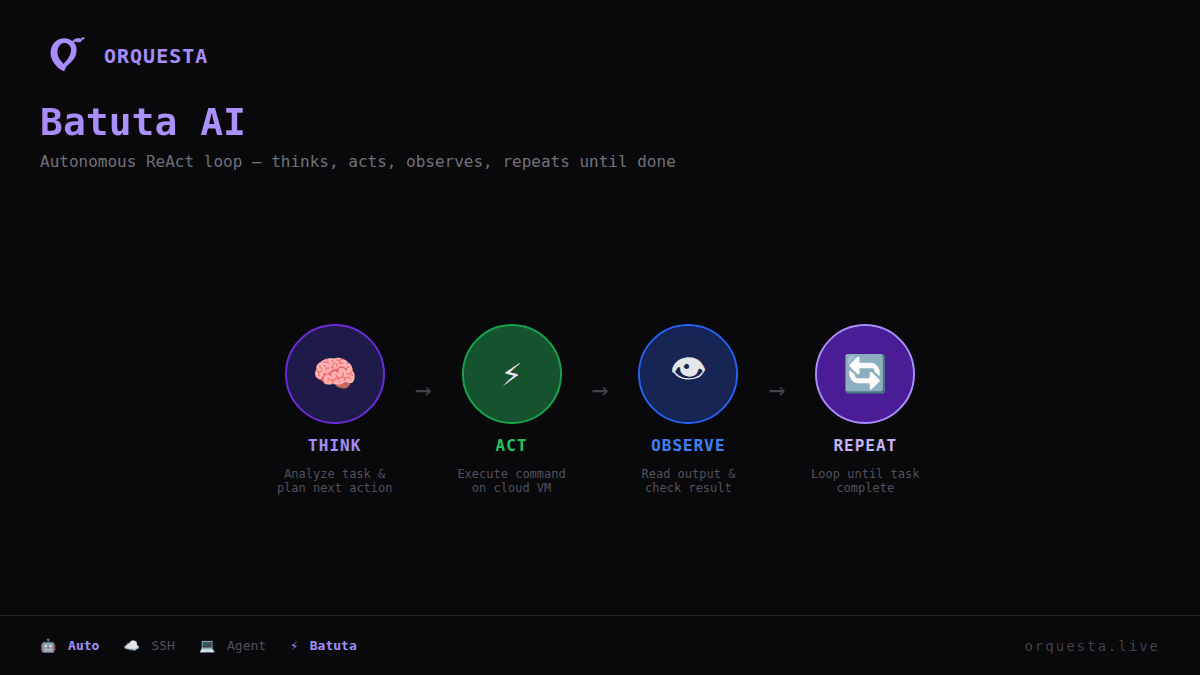
- Autonomous Loop: Utilizes Batuta AI for a fully automated execution process that can handle complex tasks efficiently.
Why Use Auto Mode?
Using Auto Mode brings several key advantages:
- Simplicity: No more second-guessing which mode to use. Just describe the task, and let the AI decide.
- Efficiency: Save time by eliminating the manual selection process, allowing you to focus on writing prompts.
- Flexibility: Whether you need to run scripts locally, remotely, or through automated loops, Auto Mode adapts to your needs.
- Control: Maintain oversight while leveraging AI to optimize execution.
How Does Auto Mode Work?
Auto Mode functions seamlessly with Orquesta's architecture to ensure tasks are executed in the best possible environment. Here’s how it operates:
- Task Description: Simply provide a clear description of what you want to accomplish. The AI processes this input and determines the appropriate execution method.
- Execution Decision: Based on various factors such as the complexity of the task, available resources, and environmental settings, Auto Mode selects between the local agent, SSH, or the autonomous loop.
- Execution: After determining the best method, Auto Mode initiates the execution and closely monitors the operation.
Scenarios for Using Auto Mode
1. Local Development: When developing features or debugging code, you may want immediate feedback. In this case, Auto Mode may choose your local agent for rapid execution.
2. Remote Server Deployments: If your task requires deploying code to a server, Auto Mode can opt for SSH to securely connect to the server and carry out the necessary commands.
3. Complex Workflows: For tasks that involve multi-step processes, Auto Mode can leverage Batuta AI to execute commands autonomously, allowing your team to focus on higher-level concerns.
Integrating Auto Mode into Your Workflow
To incorporate Auto Mode into your existing workflow, follow these steps:
- Define Your Tasks: Clearly describe the tasks you want to automate. This could range from simple scripts to complex deployment processes.
- Set Up Your Environment: Ensure that your execution environment is configured correctly with Orquesta’s integrations, including SSH access and any necessary dependencies.
- Utilize the CLI: Use the Orquesta CLI to interact with your local AI agent. It’s designed for easy command execution and integrates seamlessly with Auto Mode.
- Monitor Execution: Take advantage of Orquesta’s Agent Grid to monitor execution in real-time. You’ll be able to see which method was chosen and track progress.
Advantages of Using Auto Mode Over Manual Execution
While manual execution offers some control, it often lacks the efficiency and speed provided by Auto Mode:
- Reduced Errors: Manual selection can lead to mistakes. Auto Mode eliminates this risk by making the decision for you.
- Time-Saving: Focus on development without getting bogged down in execution method choices.
- Enhanced Productivity: With less time spent on mundane tasks, your team can prioritize higher-value activities.
Conclusion
Orquesta’s Auto Mode is not just a feature; it’s a means to streamline your development workflow. By allowing the AI to intelligently choose the best execution method—whether that’s using a local agent, connecting via SSH, or deploying through an autonomous loop—you can concentrate on what really matters: crafting quality code and delivering value to your users.
Ready to simplify your execution processes? Start using Auto Mode with Orquesta today and experience the difference.
Call to Action
Visit Orquesta.live to learn more about how Auto Mode can empower your team and bring efficiency to your workflow.
Ready to ship faster with AI?
Start building with Orquesta — from prompt to production in minutes.
Get Started Free →