Understanding Orquesta's Four Execution Modes
Explore Orquesta's execution modes—Auto, SSH, Agent, Batuta—and learn when to use each for optimal AI-driven code execution on your local infrastructure.
Orquesta provides a robust platform where AI-driven code execution is tailored to meet the diverse needs of development teams. Four distinct execution modes—Auto, SSH, Agent, and Batuta—empower users to choose the most effective path for their specific context.
Auto Mode: Let AI Decide
The Auto mode is the epitome of convenience and efficiency. When selected, the AI intelligently determines the best execution mode based on the nature of the task. This is particularly useful in environments where the variability of tasks is high, and the cost of decision-making for execution paths needs to be minimized.
When to Use Auto Mode
- Variable Task Complexity: Ideal when tasks range widely in complexity, and manual selection of modes is impractical.
- Time Constraints: Useful when quick execution is necessary, and there's no time for decision deliberations.
Auto mode is also a great starting point for teams new to Orquesta, providing a hands-off experience while they familiarize themselves with other modes.
SSH Mode: Direct Command Execution
SSH mode offers direct command execution over SSH, allowing you to run straightforward commands across your infrastructure. This mode is for those who need quick, precise control without the overhead of additional AI processing.
When to Use SSH Mode
- Simple Commands: Best for executing simple, discrete commands that don’t require AI input or decision-making.
- Low Latency Requirements: When execution speed is critical, and the overhead of AI is unnecessary.
SSH mode is the go-to choice for system administrators performing routine tasks or troubleshooting specific issues where direct control is paramount.
Agent Mode: Harness Full Claude CLI
Agent mode leverages the full capabilities of the Claude CLI. It is designed for scenarios where the complexity of tasks benefits from AI-enhanced decision-making but still requires user oversight and control.
When to Use Agent Mode
- Complex Tasks: Use when tasks are complex enough to benefit from AI processing but need to stay within human oversight.
- Code Quality Assurance: Ideal for scenarios where AI can suggest improvements, but a developer is still required to verify changes.
Agent mode is effective for developers looking to integrate AI insights into their code review and deployment processes without fully relinquishing control to the AI.
Batuta Mode: Autonomous Execution Loop
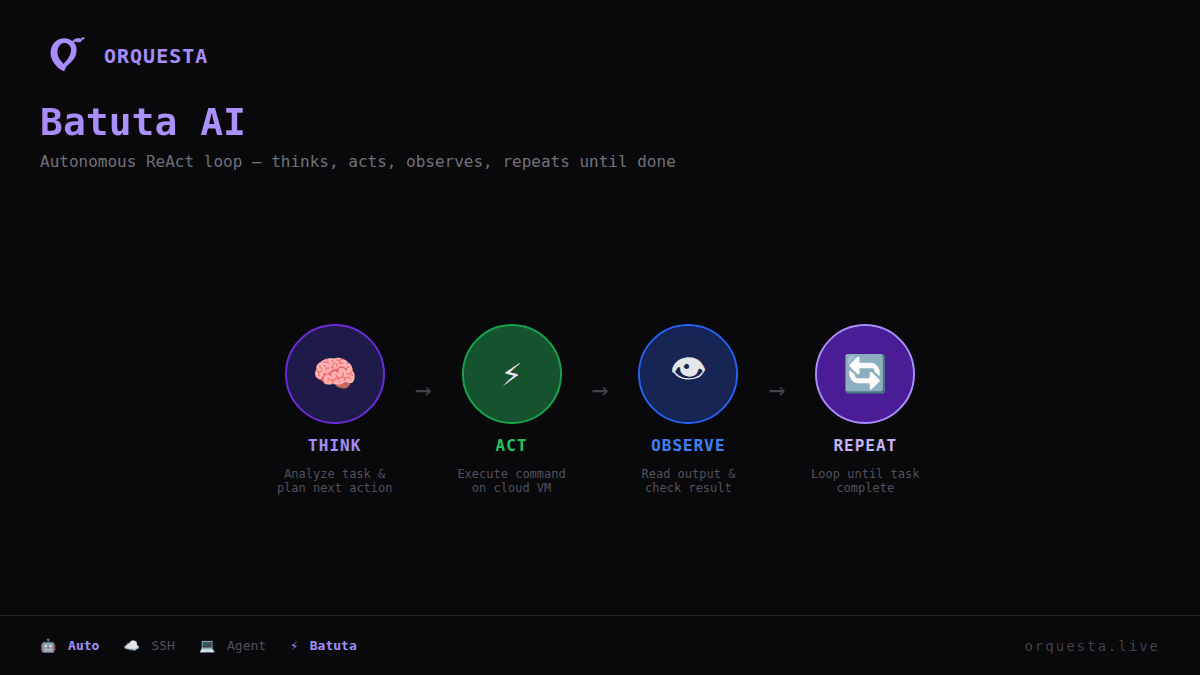
Batuta mode represents the pinnacle of autonomy within Orquesta’s execution modes. It operates on a ReAct loop—Think > Act > Observe > Repeat—enabling it to autonomously execute tasks, making decisions, and adapting based on real-time feedback.
When to Use Batuta Mode
- Routine Automation: Suitable for repetitive, well-defined tasks that benefit from autonomous execution.
- Adaptive Scenarios: In dynamic environments where the AI’s ability to adapt and respond to changes in real-time is beneficial.
Batuta mode is particularly powerful for environments demanding high efficiency and adaptability, such as continuous integration and deployment pipelines.
Decision Framework for Teams
Choosing the right execution mode requires understanding the nature of your workload and the level of oversight you require. Here’s a quick framework to guide your decision-making:
- Evaluate Task Complexity: Determine if the task is simple or complex. Complex tasks benefit more from AI-enhanced modes like Agent or Batuta.
- Determine Control Needs: Decide how much control you require. SSH offers full control, while Batuta offers autonomy.
- Consider Time Constraints: If speed is critical, Auto or SSH might be more appropriate.
- Assess Adaptability Requirements: For tasks needing real-time decision-making, Batuta provides the necessary adaptability.
This framework helps teams balance control, efficiency, and adaptability—ensuring that Orquesta's AI-driven execution aligns with their strategic objectives.
By understanding and effectively utilizing these modes, teams can better leverage Orquesta to streamline their workflows, enhance code quality, and optimize deployment processes without compromising on control or efficiency.
Ready to ship faster with AI?
Start building with Orquesta — from prompt to production in minutes.
Get Started Free →