Managing Local LLMs with Orquesta CLI and Dashboard Sync
Discover how Orquesta CLI empowers you to manage local LLMs and sync configurations to a cloud dashboard, ensuring seamless prompt history tracking and bidirectional config updates.
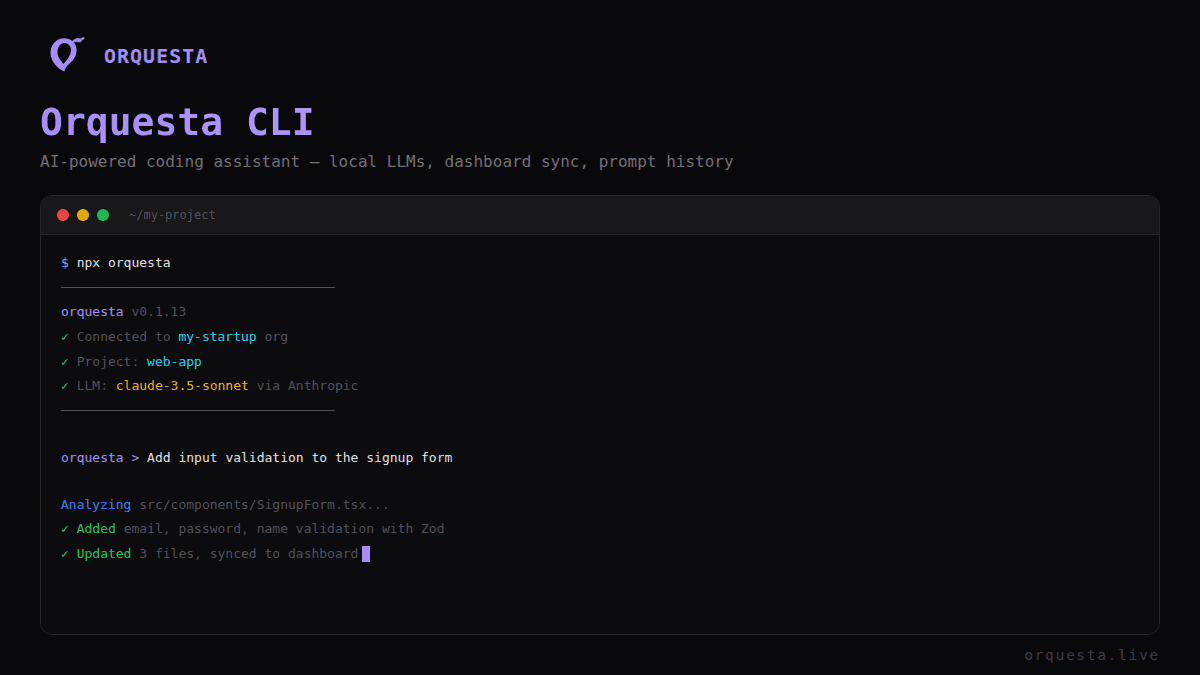
Managing local language models (LLMs) efficiently is crucial for developers who want to leverage AI capabilities without compromising their infrastructure's security. Orquesta CLI offers a robust solution by enabling developers to run LLMs like Claude, OpenAI, Ollama, and vLLM locally while maintaining a seamless sync with a cloud dashboard. This approach provides a balance of local control and cloud-based convenience.
The Power of Local LLM Management
With Orquesta CLI, you're not just running models locally; you're integrating them into a structured workflow. This ensures that your code and data remain within your infrastructure, reducing the security risks associated with cloud-based LLMs. Here's how it works:
- Run LLMs Locally: Use the Orquesta CLI to spin up LLMs directly on your machine, leveraging your existing hardware and network configurations.
- Config Sync: All configuration settings for these models are seamlessly synced with a cloud dashboard, allowing you to manage parameters centrally without direct cloud execution.
- Prompt History Tracking: Every prompt you run is logged and accessible, providing a complete audit trail and facilitating team collaboration.
The CLI tool is designed to ensure that even if you're running models on-premises, you retain the collaborative and organizational benefits of cloud solutions.
Architecture Overview
The architecture of Orquesta's LLM management is straightforward yet powerful:
- Local Execution: Through the CLI, you launch LLMs directly on your hardware.
- Dashboard Integration: The CLI interfaces with a cloud-based dashboard, ensuring that all configurations and logs are synchronized.
- Bidirectional Sync: Any changes made on the dashboard are reflected locally, and vice versa. This is crucial for maintaining consistent environments across different setups.
Here's a glimpse of how you might configure and manage these setups:
# Install the Orquesta CLI
$ curl -sSL https://orquesta.live/install.sh | bash

# Run an LLM locally
$ orquesta run-llm --model claude --config /path/to/config.yaml

# Sync with dashboard
$ orquesta sync
Prompt History and Organizational Tokens
One of the standout features of Orquesta CLI is its comprehensive prompt history tracking. This feature logs every interaction with the LLMs, which is invaluable for debugging, compliance, and collaborative development. Additionally, tokens are scoped to the organization level, ensuring that access and billing are managed efficiently.
Benefits of Prompt Tracking
- Auditability: Every prompt and its corresponding output are recorded.
- Collaboration: Team members can review past interactions, facilitating seamless transitions and knowledge sharing.
- Optimization: Analyze prompt performance to refine and optimize interactions with LLMs.
Working with Org-Scoped Tokens
Managing tokens at the organization level simplifies access control and billing. The CLI allows you to:
- Issue and revoke tokens as needed, ensuring only authorized users have access.
- Track usage by project or team, streamlining cost management.
Bidirectional Configuration Sync
Configuration management can be a hassle, especially when teams are distributed or when multiple environments need to be kept in sync. Orquesta simplifies this process:
- Cloud to Local: Make a change in the dashboard, and it automatically updates your local configuration.
- Local to Cloud: Adjust settings locally, and they propagate to the dashboard.
This bidirectional sync ensures that every team member is working with the most up-to-date configurations, reducing the risk of errors and inconsistencies.
Conclusion
Orquesta CLI transforms local LLM management from a complex task into a streamlined process. By running models locally and syncing configurations and histories with a cloud dashboard, developers can maintain security and control without sacrificing collaboration and efficiency. Whether you're managing prompts or orchestrating configurations, Orquesta ensures you're equipped with the tools needed for effective AI development.
Incorporate Orquesta CLI into your workflow today and experience the seamless integration of local and cloud-based resources. It's a tool designed by developers, for developers, ensuring that your AI projects are both robust and secure.
Ready to ship faster with AI?
Start building with Orquesta — from prompt to production in minutes.
Get Started Free →